


June 1, 2026
Yes. ExamSoft detects cheating. It does so through a combination of complete device lockdown, continuous video and audio recording, screen capture, and AI-powered behavior...


Every version of ProctorU, whether Live+, Review+, or Record+, runs through the same piece of software called Guardian Browser. That browser is the foundation.
It does not just sit there. It scans your hardware and blocks applications. It also records everything it hears and sends it all to your instructor.
Below is exactly how each part works, what gets recorded, and what your school sees after the exam ends.
Guardian Browser is the mandatory software you install before any ProctorU exam. It is not Chrome with an extension. It is a standalone lockdown browser built from scratch to control your entire testing environment. This runs its own security checks before you even see the first question.
The first thing the Guardian does is a deep system scan. The software will check your hardware configuration. It will note all the running processes, open network ports plus all installed applications.
If it finds something it does not like, your exam will not launch. Common things that trigger it are virtual machines and remote desktop tools. Certain background services or even a monitor resolution below 1366 by 768 could also make the browser deny you access to the exam.
The software demands 8GB of RAM at a minimum. This is a high bar compared to other proctoring tools. But it ensures its recording and detection functions run smoothly on your machine without lag that might create blind spots.
After the system check passes, Guardian locks your screen. The lockdown covers everything. Keyboard shortcuts and hotkeys are disabled. The Windows key, Alt+Tab, Print Screen, all dead. Copy and paste functions are killed system wide. You cannot open any other application or browser tab. Printing is blocked. The only thing your computer does is run the exam inside Guardian.
Guardian also hunts for virtual machines. Running an exam inside a VM was once a popular bypass, but ProctorU actively writes its code to detect virtualized environments. It looks for VMware drivers, VirtualBox registry keys, and hardware IDs that are unique to virtual machines. If it finds any of these, the exam session is blocked before it starts.
During the initial setup phase, the proctor can also take temporary control of your mouse and keyboard. This is not surveillance. It is how they help you navigate to the exam launch page, enter passwords, or close any prohibited background applications that Guardian flagged during the scan. You grant this access at the start of the session, and it ends once the exam begins.
Once the exam starts, Guardian activates its full recording suite. Three data streams run simultaneously for the entire duration of your test.
All the above three recordings are synced. When your instructor reviews the session later, they will watch your webcam video alongside your screen activity, plus hear your audio, all on the same timeline.
The recordings belong to your school, not ProctorU. The data is stored on servers encrypted with AES 256-bit security.
According to ProctorU’s published policy, data may be deleted after one year, but your institution can set a shorter or longer retention period. Some schools keep recordings for the duration of your academic program.
So you could be accused of cheating days after you finish the exam, long after you thought you were in the clear. The review window is never immediate. The evidence is gathered, stored, and examined at the instructor’s convenience.
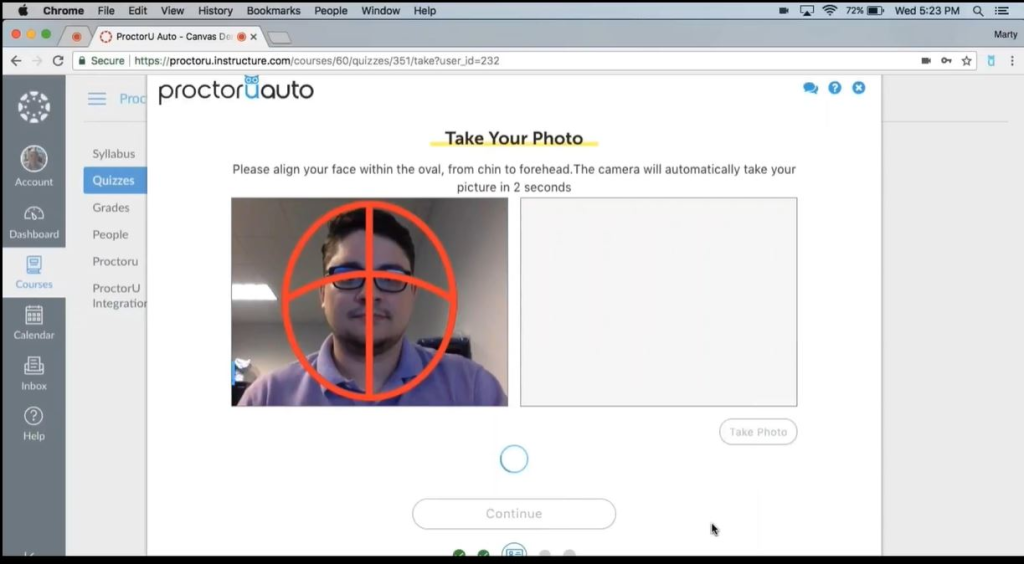
ProctorU does not just catch obvious cheating like pulling out a phone. It catches subtle things like a change in your typing rhythm or a face that does not match the ID photo perfectly. The combination of live monitoring, AI review, and biometric profiling creates a net that is difficult to wriggle through.
The Guardian Browser stops most software-based tricks before the exam even launches. The screen recording captures everything you do on the computer.
The webcam and microphone capture everything you do off the computer. The keystroke dynamics ensure that even if someone takes over your keyboard remotely, the system notices the difference in typing style. The facial photos taken mid exam prevent a swap after the ID check.
And the recordings are stored long enough that your instructor can review the entire session at their own pace, pausing and zooming in wherever they like.
Knowing how ProctorU works gives you a clear picture of what you are up against. The platform is designed to leave very few gaps.
If you are facing a ProctorU exam and you are not ready, you now understand exactly what stands between you and a passing grade.
There is a way to cheat ProctorU and navigate around all these layers without triggering a single flag. This is by hiring us to take the exam for you. You only need to sit in front of the camera, complete the ID checks, and appear in every way like a normal test taker. Meanwhile, we will have bypassed the software to handle the test on your behalf.
ProctorU’s surveillance is thorough. But it only catches what it can see. Let us make sure it sees nothing by booking your exam seat now.
Yes. ExamSoft detects cheating. It does so through a combination of complete device lockdown, continuous video and audio recording, screen capture, and AI-powered behavior...

Yes. Honorlock records your screen during exams. This is not a “maybe” situation. If your instructor turned on the Screen Record setting, and most...

Yes. ProctorU catches phones by using a live human proctor, not just software. A real person watches your webcam, screen, and audio. If you...

[…] ProctorU and Respondus Monitor rely heavily on human proctors to review flagged moments after the exam. OnVUE’s AI acts instantly to terminate the session immediately. The AI does not just flag. It enforces. […]